EVERGREEN · WHOLE-APPLICATION COVERAGE
Secure in place across your entire application
CVE counts in your scanners keep climbing, and for dependencies that no longer get upstream fixes, the only choices are delaying roadmap work or accepting the risk for another quarter. Evergreen remediates CVEs at scale across your application, so you stay on the version lines you run and migrate on your own timeline.
What you get with Evergreen
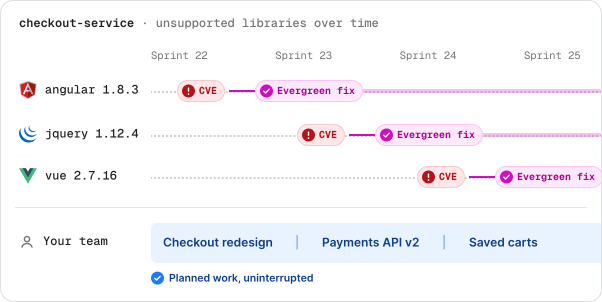
Your developers stop handling CVEs one library at a time
A CVE on an unsupported library pulls engineers off planned work, and more CVEs land on other libraries before the fix ships. Evergreen covers all unsupported libraries across your application and builds the fix each time a CVE lands, so your developers stay on planned work.
Your engineering team stays covered as open source dependencies lose support
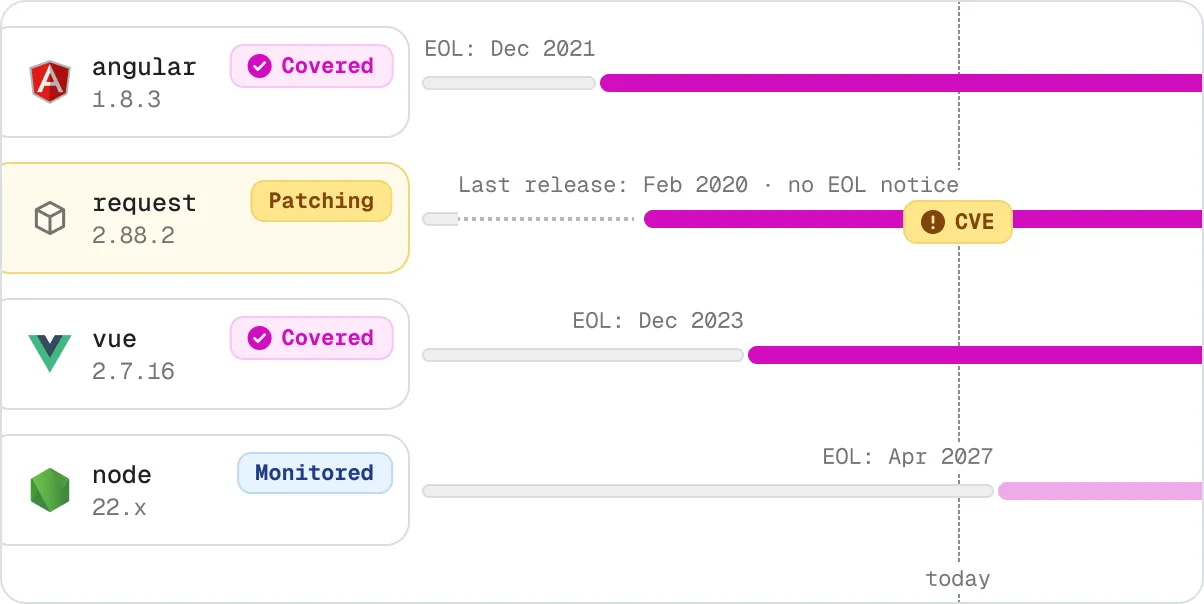
Some dependencies announce an end-of-life date, and others just stop getting upstream fixes. Your team usually finds out when a CVE lands and no patch comes. Evergreen covers dependencies as they lose support, so a fix is already on the way when a CVE lands.
Your engineering team gets the fix, not a migration project
For a CVE on an unsupported dependency, your scanner suggests upgrading to the next major version, which means new APIs, code changes, and retesting. Evergreen delivers a drop-in replacement on the version line you already run, so you migrate on your own schedule.

Your security team closes the findings it had to accept as risk
A CVE on an unsupported dependency has no fix to apply, so the finding goes back on the risk register quarter after quarter. Evergreen delivers the fix and a named maintainer for the patched release line, so the finding comes off the risk register.

Your compliance team has the evidence before the audit
When an auditor asks how a CVE on an unsupported dependency was handled, your team pieces together tickets and email threads to answer. Evergreen adds a VEX statement and a legal attestation to your repository with each fix, so your team answers by pointing the auditor to a file.

A proven enterprise-scale solution
19M+
package versions tracked
1,000+
vulnerabilities remediated
50%+
of the Fortune 100
Engineers build the fix.
AI finds the work.
The replacement is the hard part, and a HeroDevs engineer builds it. Nothing gets built until it is clear what needs replacing, so detection runs on AI at a scale no team could match.

Engineering Experts
Replacements built by the people who wrote the framework
A HeroDevs engineer builds and reviews every replacement before it reaches your repository, someone who knows why that version behaves the way it does, what depends on it, and what breaks when you change it.

AI
Detection at a scale
humans can’t reach
Scans every repository in your application continuously and flags every dependency that has reached end-of-life, including the projects that were quietly abandoned and never announced. That is work no team could do manually.
Install once. Everything after that is Evergreen running on its own.
One-time setup
Continuous — The platform runs for as long as your application uses open source software
Install
Install the HeroDevs GitHub App, select every repository that is part of your application, and merge one GitHub Actions workflow. Scanning cadence and pull request behavior are set during onboarding.
Scan
Once the workflow is merged, scanning runs automatically. HeroDevs monitors your entire open-source dependency tree, detecting vulnerabilities and unsupported dependencies.
Track
When a CVE lands on an EOL dependency, HeroDevs identifies an already-secured replacement or builds one; we handle the fix, and you stay focused on building the features.
Remediate
HeroDev’s source control management (SCM) integration automatically opens a pull request that swaps the vulnerable dependency for the secured, drop-in replacement.
Prove
Every remediation comes with updated VEX statements and legal attestations, proving to your legal team and compliance officers that you are secure.

Ensuring full compliance and security
HeroDevs ensures your unsupported and unmaintained open-source software stays fully compliant with regulations like SOC 2, FedRAMP, PCI, HIPAA, DORA, and CRA. With ongoing security updates and a commitment to audit readiness, you can rest easy knowing your systems remain compliant, secure, and ready for any inspection.


Find out what’s unsupported in your stack before something else does
Run a free EOL scan against your codebase in minutes. No commitment, no sales call required.


Questions engineering and security teams ask
Get answers to some of our most commonly asked questions. Of course, if you can't find the answer you're looking for, feel free to contact us.
Request a Demo
Discover how HeroDevs can keep your systems secure and compliant.
Learn how our solutions can deliver value to your organization.


